PR Sift
Chrome extension for pull request reviewsReview large GitHub pull requests without the noise: show only the files you care about, mark what you have read and keep private notes for your AI assistant. Free, with no account and no server.
- Chrome
- Edge, Brave, Arc, Dia
- Since Nov 2026
- PolyForm Shield licence
- Website
- User guide
- GitHub
Overview
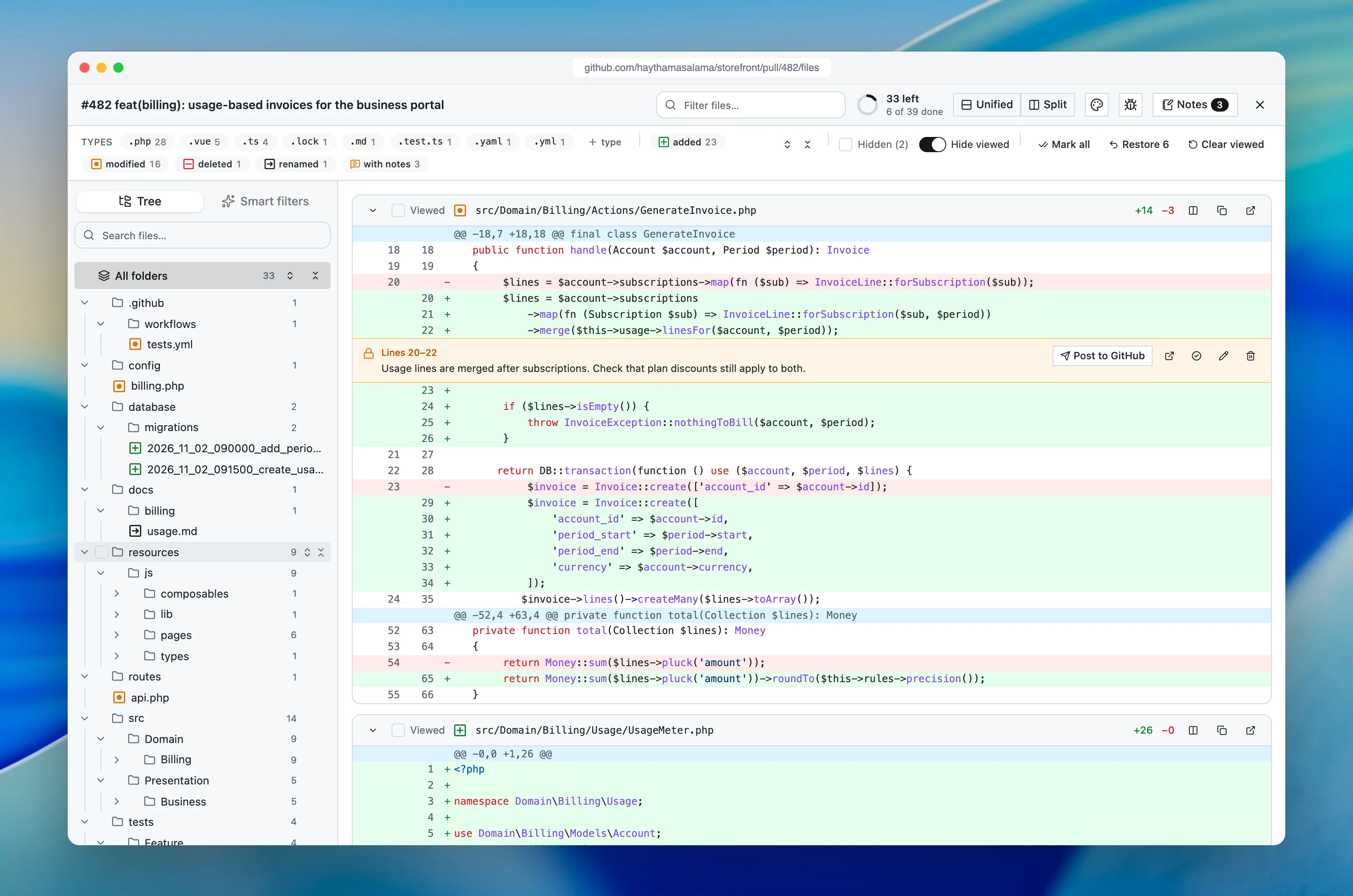
PR Sift turns a long GitHub pull request into a focused review. Open any pull request, press PR Sift at the bottom right, and the files you don't need step aside. It works in Chrome and in Chromium browsers such as Edge, Brave, Arc and Dia. I started it in November 2026, and it is on its way to the Chrome Web Store.
What it does
Show only the files you want
Click a file type or a kind of change to show it. Shift-click to hide it for good.
Never read a file twice
Mark files or whole folders as viewed. A new push brings back only the files that changed.
Private notes for your AI
Notes only you see. Copy them for Claude Code, Codex, Cursor or ChatGPT, or post one to GitHub.
Privacy
Your code stays in your browser. PR Sift talks only to GitHub, keeps filters, viewed marks and notes on your computer, and has no server, account or analytics.